• Home
  • Categories
    • Appointments and schedule
    • Lead management
    • OPD
    • IPD
    • ANC
    • Management
    • Accounts Management
  • Contact Us
  • Support
  • Home
  • Categories
    • Appointments and schedule
    • Lead management
    • OPD
    • IPD
    • ANC
    • Management
    • Accounts Management
  • Contact Us
  • Support
home/Knowledge Base/CPH/Dashboard/View Login Instance

View Login Instance

30 views 1

Written by plus91
September 8, 2023

This Article will guide you on ‘View Login Intance’.

Users needs to follow below steps.

1. Login into the CPH Link, the Dahsboard screen will be displayed.


2. Click on the ‘Management’ option from the Dashboard, once clicked the Management screen will be diplayed.
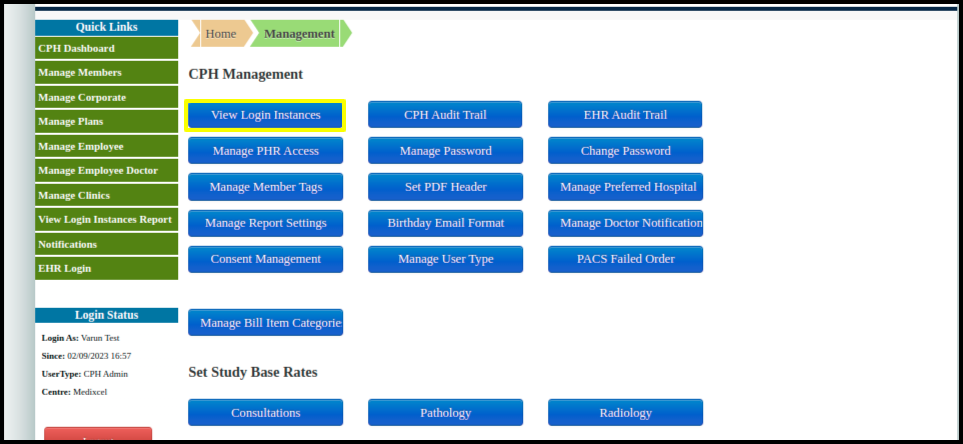
 

3. Click on the View Login Instance option, the View Login instance screen will be displayed.

4. Enter the date range and select the filter for the required data.
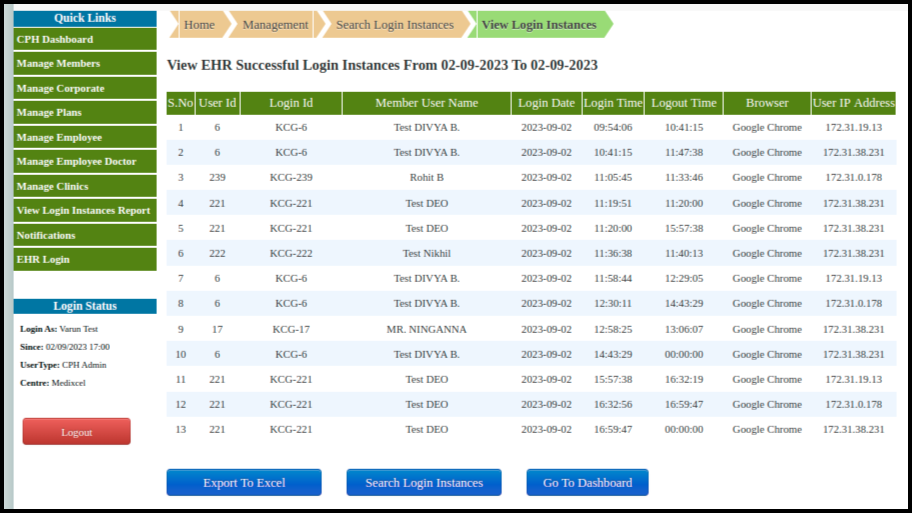
Here user will be able to export the data in excel format and return to the search screen.


Was this helpful?

1 Yes  No
Related Articles
  • Manage Helper Fields
  • Manage Medical Group
  • Manage Helpers
  • Manage Helper Field Calculation
  • Import/Export Helpers
  • Manage Vital Mapping
Leave A Comment Cancel reply

Popular Articles
  • Create A Purchase Store
  • OPD Other Study Bill Report
  • Manage Helper Fields
  • Manage Modality
  • Manage Helpers
KB Category
  • Quick Links
  • Master Management
  • Inventory Management
  • Admit process
  • Scan & Share
  • Milestone 3
  • Milestone 2
  • Waste Management
  • Day Observation / Detention
  • Biomedical Waste Management
  • Dashboard
  • Accident & Emergency Ward Management
  • Milestone 1
  • ABDM
  • Blood Transfusion Request
  • Transfusion Medicine Unit
  • Operation Theatre Calendar
  • Listing
  • Appointment view
  • Listing
  • Pediatric
  • Appointment View
  • Mortuary Management
  • Management
  • Linen & Laundry
  • Request Blood Product
  • Blood Lab Service
  • Lab Service
  • Taxation Management
  • IPD From CPH
  • Recommendation Panel
  • Mortuary Reports
  • Mortuary plan
  • Oncology
  • NABH KPI Dashboard
  • NABH Dashboard
  • Dashboard
  • CPH
  • Surgery Recommendation
  • Inventory Dashboard
  • Calendar View
  • Dialysis Management
  • A & E Ward
  • OPD Reports Management
  • IPD Reports
  • OPD Reports
  • Others Bill Report
  • Accounts management
  • Management
  • ANC
  • Reports Management
  • Lead Status
  • Lead Management
  • Help and Support Management
  • Blood Bank Report
  • Appointment View
  • Dental Managment
  • Patient Record
  • Reports Managment
  • Schedule Status
  • Filters
  • Calender view
  • LIS
  • IPD
  • OPD
  • Pharmacy
  • IPD Patient Records
  • IPD Registered
  • IPD Bill reports
  • Station
  • Medicine PO
  • MIS Report
  • MIS
  • Medicine Report
  • Medicine Dispense
  • IPD Admission Process
  • Appointments and Scheduling
  • values and parameters
  • Consultation account
  • Master management
  • Ward status
  • Schedule Manager
  • Print report
  • Lab Process
  • Lab MIS Report
  • Pharmacy Reports

  Ticket Management

Manage Modality  

plus91_logo
MediXcel is a flexible software solution for clinics, out-patient departments inside hospitals and clinic chains. It manages Medical Data of the patients and Administrative data of the practice. Its design lets user store data with ease, quickly retrieve data and use this data in various combinations and formats to make better decisions on patient treatment, customer service and practice profitability.
Company
  • Careers
  • Mission/Vision
Support
  • Knowledge Base
  • Video Manuals

[google-translator]

  • Policies
  • Certificates
  • © Plus91 Technologies All Rights Reserved