• Home
  • Categories
    • Appointments and schedule
    • Lead management
    • OPD
    • IPD
    • ANC
    • Management
    • Accounts Management
  • Contact Us
  • Support
  • Home
  • Categories
    • Appointments and schedule
    • Lead management
    • OPD
    • IPD
    • ANC
    • Management
    • Accounts Management
  • Contact Us
  • Support
home/Knowledge Base/Dialysis Management/Calendar View/Generating the Print & Email Report For Dialysis Patient

Generating the Print & Email Report For Dialysis Patient

188 views 0

Written by plus91
July 20, 2023

This article will guide you on how to generate the print email report.To view, adding an appointment for a new  patient click here.

1. Once you save the appointment it is successfully displayed in the appointment calendar.
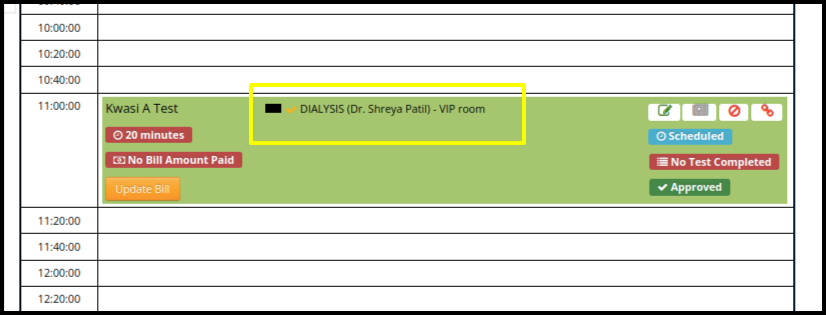
2. Select the service name from the appointment to generate the print and email report.

3. Once you click on the service, the doctor consultation page will be open.
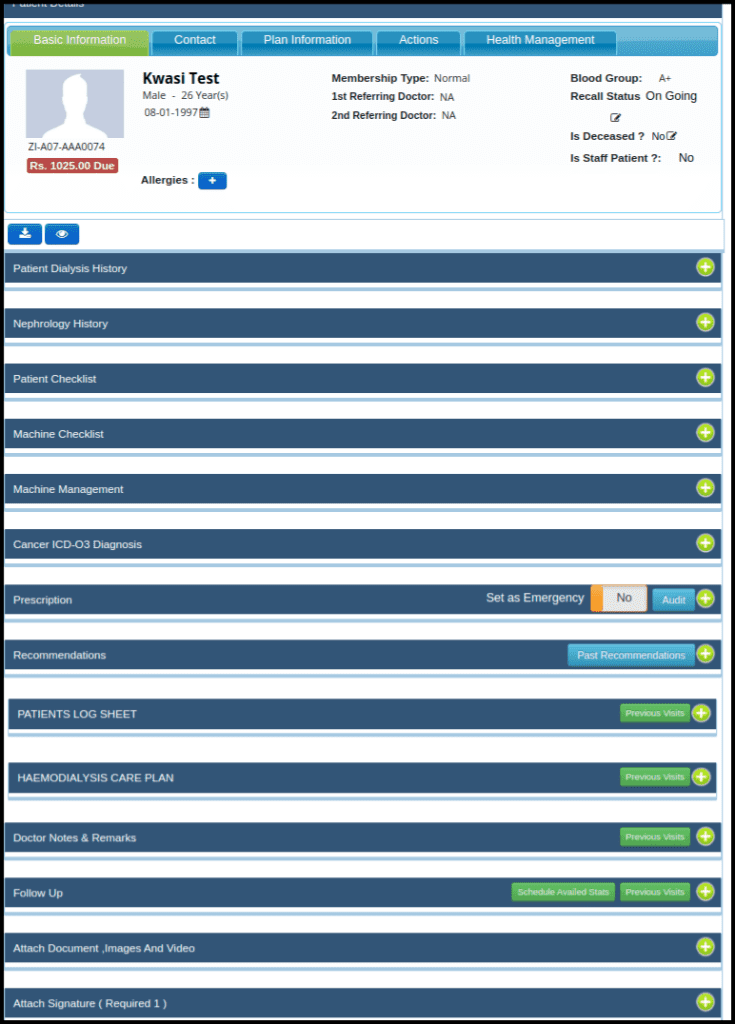
  • To generate the print and email report,  fill up all the helpers which are in the doctor’s consultation page.
  • After entering all detalis click on the save draft and save finalize button.

4. Once you finalized the appointment, the Print and email report button will be open to generate the report.

5.Once you click on the print & Email Report button the following screen will be display such as:-

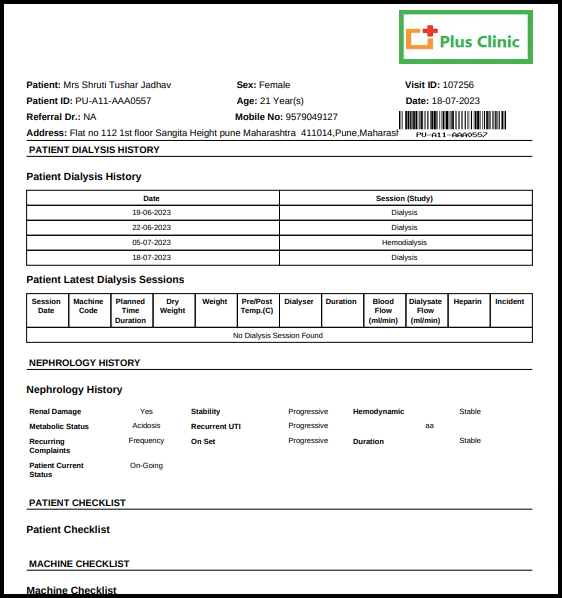
Image 1.
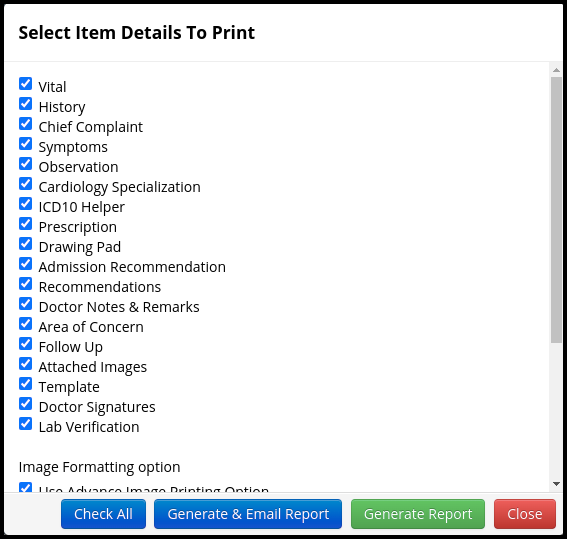
Image 2.
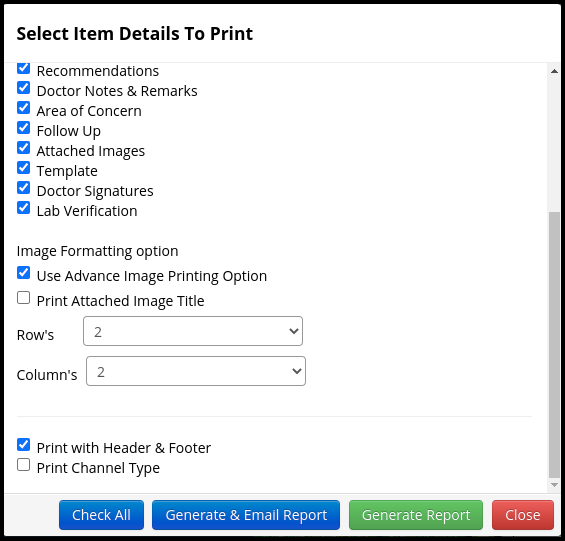
  • According to your need click on the check box. So according to that report will generate.
  • To generate only a report just click on the “Generate Report” option only.

6. To send a report to the patient via email click on “Generate & Email Report”
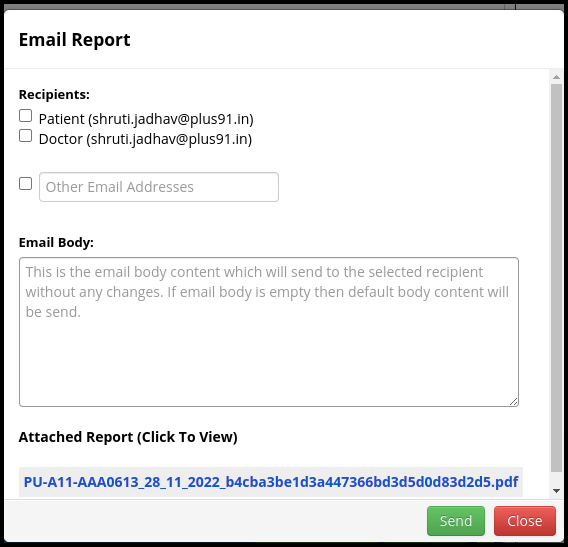
  • In the Screen users can check the following point such as
    a. In the recipients section users can email the report to patient as well as Doctors or any other person if select the certain checkbox such as
    I. Patient
    II. Doctor
    III. Other Email address
    b. In the email body users can write an important message to send a report In the attached report by default report will be attached in the PDF format.
    c. In the attached report by default report will be attached in the PDF format
    d. Once you have fulfilled all the parameter in the screen, then click on the send option to email the report 
  • Generate Report

  • So In this way we can generate and email consultation reports for the patients.
A blank square indicates that there is no interface between the respective entities. Participants expressed negative emotions associated with obesity. Use the according references when citing chart information in a single or album page. A red sky means there's dust in the air, which shows high pressure, meaning good weather is coming. We know that, there are many banks in Bangladesh No hesitation Bangladesh Bank job is good choice for you. One always ends up with a bit of confusion when it comes to definitions like this. Improvements in consumer-friendly packaging and marketing were also launched, such as the color-coded variants for the San Miguel animal health care line. Bragadin put up a heroic struggle lasting well beyond the most optimisti This intermediate has its positive charge localized on an unsaturated carbon, and such vinyl cations are less stable than their saturated analogs. The match started off with Mysterio getting the advantage over Angle, as he hid under the ring, and when Mysterio's music hit, he took down Angle with a headscissors. You'll find handmade Christmas ornaments in clay, jewelry, and works of art. The recent stock firmware ATA and phone that naf found is no longer available. An implantable cardioverter defibrillator ICD is a small electronic device connected to the heart. Whilst building SLR capacity in Australia, we seek to highlight the influence of an additional tracking station in this area of the Southern Hemisphere. About Us Our company was founded in with a small staff. Preliminary study of carbamazepine in post-traumatic stress disorder. After completing this degree you'll be eligible to register with the Nursing and Midwifery Council, the professional regulatory body for nurses and midwives in the UK.
Tags:Dialysis Print & Email ReportGenerating the Print & Email Report For Dialysis Patient

Was this helpful?

Yes  No
Related Articles
  • Patient Records of Dailysis management
  • Dialysis Schedule Update
  • Dialysis Consultation Print Prescription
  • Dialysis Patient consultation Summary
  • Consultation page from Dialysis Schedule
  • Patient’s Dialysis Appointment
Leave A Comment Cancel reply

Popular Articles
  • Create A Purchase Store
  • Dialysis Consultation Print Prescription
  • Request Blood Product
  • Study Report
  • Manage Taxation Policy
KB Category
  • Quick Links
  • Master Management
  • Inventory Management
  • Admit process
  • Scan & Share
  • Milestone 3
  • Milestone 2
  • Waste Management
  • Day Observation / Detention
  • Biomedical Waste Management
  • Dashboard
  • Accident & Emergency Ward Management
  • Milestone 1
  • ABDM
  • Blood Transfusion Request
  • Transfusion Medicine Unit
  • Operation Theatre Calendar
  • Listing
  • Appointment view
  • Listing
  • Pediatric
  • Appointment View
  • Mortuary Management
  • Management
  • Linen & Laundry
  • Request Blood Product
  • Blood Lab Service
  • Lab Service
  • Taxation Management
  • IPD From CPH
  • Recommendation Panel
  • Mortuary Reports
  • Mortuary plan
  • Oncology
  • NABH KPI Dashboard
  • NABH Dashboard
  • Dashboard
  • CPH
  • Surgery Recommendation
  • Inventory Dashboard
  • Calendar View
  • Dialysis Management
  • A & E Ward
  • OPD Reports Management
  • IPD Reports
  • OPD Reports
  • Others Bill Report
  • Accounts management
  • Management
  • ANC
  • Reports Management
  • Lead Status
  • Lead Management
  • Help and Support Management
  • Blood Bank Report
  • Appointment View
  • Dental Managment
  • Patient Record
  • Reports Managment
  • Schedule Status
  • Filters
  • Calender view
  • LIS
  • IPD
  • OPD
  • Pharmacy
  • IPD Patient Records
  • IPD Registered
  • IPD Bill reports
  • Station
  • Medicine PO
  • MIS Report
  • MIS
  • Medicine Report
  • Medicine Dispense
  • IPD Admission Process
  • Appointments and Scheduling
  • values and parameters
  • Consultation account
  • Master management
  • Ward status
  • Schedule Manager
  • Print report
  • Lab Process
  • Lab MIS Report
  • Pharmacy Reports

  Dialysis Schedule Update

Patient Records of Dailysis management  

plus91_logo
MediXcel is a flexible software solution for clinics, out-patient departments inside hospitals and clinic chains. It manages Medical Data of the patients and Administrative data of the practice. Its design lets user store data with ease, quickly retrieve data and use this data in various combinations and formats to make better decisions on patient treatment, customer service and practice profitability.
Company
  • Careers
  • Mission/Vision
Support
  • Knowledge Base
  • Video Manuals

[google-translator]

  • Policies
  • Certificates
  • © Plus91 Technologies All Rights Reserved